Building an AI Travel App That Doesn't Hallucinate
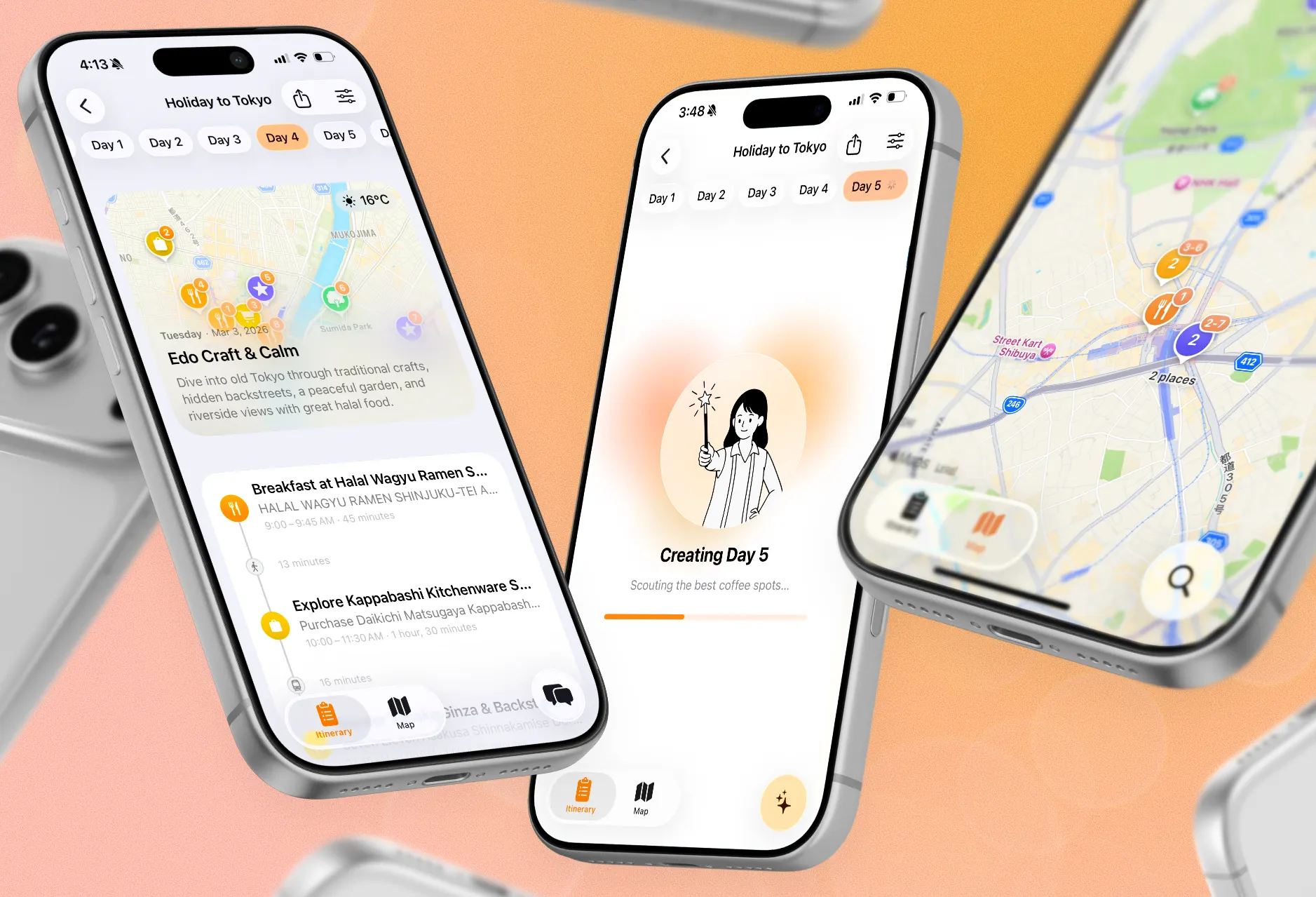
Most AI travel tools are wrappers. A text box, a prompt, a list of places pulled from web search. That’s fine for a quick answer, but it’s not a travel planning tool. It doesn’t know what’s near what, can’t rearrange your afternoon when it rains, and forgets everything the moment you close the tab.
I wanted to build something that felt like a real app, not a chatbot skin. Tripstitch is a native iOS app with maps, editable itineraries you can swap and tweak activity by activity, offline access, and CloudKit sync. The AI (a travel companion called Mia) handles the creative work: pacing, neighborhood mixing, balancing museums with food. But every place she suggests gets resolved against Apple Maps via MapKit, both server-side during generation and on-device after. Not web search. Actual structured point-of-interest data with coordinates, categories, and distance.
This post is about how that pipeline works: the Apple Maps tool integration, the streaming architecture, the SwiftData workarounds, and what I learned building it solo.
The AI pipeline
Itinerary generation happens in two steps, not one. I tried the obvious approach first (one giant prompt that spits out a complete itinerary) and the results were mediocre. The model would run out of steam on day 4, or frontload all the good spots into day 1, or zigzag across the city with activities in no logical order.
So I split it. Step one generates an outline: themes for each day, region assignments, high-level pacing. Step two generates each day individually, using the outline as context. The model can focus. Day 3’s temple-and-garden day doesn’t need to hold day 1’s street food crawl in its context window.
Both steps are server-side jobs. The client submits a generation request, gets back a job ID, and subscribes to a WebSocket channel for progress. When the job completes, the result arrives as structured JSON, not freeform text, and the client decodes it directly into Swift models.
The important part: the model doesn’t just generate text. It has tools.
Grounding with Apple Maps tools
The day generation agent has access to a SearchPlacesTool that calls the Apple Maps Server API. When the model needs a restaurant for dinner in Shibuya, it doesn’t guess a name from its training data. It calls the tool, gets back real places with coordinates, categories, and distances, and picks from those.
The tool takes a category (one of ~40 POI types like “restaurant”, “museum”, “park”), a region from the trip outline, and an optional query to narrow results (like “ramen” or “halal”). The backend resolves the region name to coordinates, searches Apple Maps within a radius, and returns results sorted by distance.
$results = $this->appleMapsClient->searchByCategory(
    lat: $coords['latitude'],
    lng: $coords['longitude'],
    categories: self::CATEGORY_MAP[$category],
    query: $request['query'] ?? $defaultQuery,
    radiusKm: $request['radius'] ?? 2,
    limit: $request['limit'] ?? 10,
);
Apple Maps auth is JWT-based. The backend signs a short-lived token with an ES256 key, exchanges it for an access token, and caches it for 29 minutes. Straightforward, but one of those things that takes an afternoon to get right because the Apple docs don’t show you a working example.
The model also has a GetTravelTimeTool that estimates transit between locations. This means it can build itineraries where consecutive activities are actually near each other, not scattered across the city. It can check its own work.
During chat, the tool set expands. Mia has 10 tools total: search places, get day/activity details, modify activities, add or remove stops, swap days, check travel times, and get an itinerary overview. All modifications require user confirmation on the client side before they’re applied. Nothing changes until you say so.
The result: every place in a Tripstitch itinerary comes from Apple Maps, not the model’s imagination. The iOS client does a second pass with MKLocalSearch to create map pins with native MapKit integration, but the heavy lifting happens server-side during generation. The model picks from real options instead of inventing fake ones.
Streaming and the backgrounding problem
Generation is slow. Building a full day can take up to a minute with tool calls. Users need to see progress, so the pipeline streams over WebSocket.
The client subscribes to a channel and receives typed events: text_delta for streaming text, tool_call when the AI invokes a tool, tool_result with the outcome. The chat UI renders these live. You can watch Mia think.
for await (eventName, eventData) in stream {
    try Task.checkCancellation()
    let event = parseWebSocketChatEvent(eventName: eventName, data: eventData)

    switch event {
    case .textDelta(let delta):
        streamingContent += delta
        assistantMessage.content = streamingContent
    case .toolCall(let name, _):
        steps.append(AgentStep(toolName: name, description: description))
        streamingContent = ""
    case .streamEnd:
        break streamLoop
    }
}
The problem I didn’t anticipate: iOS backgrounds your app the moment the user switches to Safari to look something up. WebSocket connections die. If generation completes while the app is backgrounded, the client never gets the event.
The fix is a withThrowingTaskGroup that races two strategies: listen to the WebSocket, and poll the server each time the app returns to foreground. First one to get a result wins, the other gets cancelled.
func awaitCompletion(jobId: String) async throws -> JobResult {
    try await withThrowingTaskGroup(of: JobResult.self) { group in
        group.addTask {
            try await self.awaitWebSocketResult(jobId: jobId)
        }
        group.addTask {
            try await self.awaitForegroundReturnResult(jobId: jobId)
        }
        let result = try await group.next()!
        group.cancelAll()
        return result
    }
}
Generation runs server-side, so it keeps going regardless of what the app is doing. The WebSocket gets the result instantly if the app is in the foreground. But if the user switches to Safari mid-generation and iOS kills the socket, the polling task picks it up: it listens for UIApplication.didBecomeActiveNotification and checks the job status each time the app comes back. No result is ever lost.
Swift concurrency and SwiftData
Tripstitch uses Swift’s strict concurrency model. Everything is @MainActor by default. SwiftData models are main-actor-isolated, so any code touching the model graph runs on main. Sounds limiting. In practice it simplifies everything. No data races, no “which thread is this on” questions, no DispatchQueue.main.async.
The concurrent place resolution works because await yields the main actor. Ten MKLocalSearch requests launch concurrently, and while they wait on the network, other code runs. Interleaving happens at await points, not on background threads. This sounds obvious in a WWDC talk but takes a while to trust in practice.
SwiftData with CloudKit was the hardest part of the project, and not for interesting reasons. CloudKit doesn’t support composite attributes. If you use a Swift enum as a model property, SwiftData encodes it as a composite attribute that silently fails to sync. The fix: store the raw value, use a transient computed property.
@Model
final class ChatMessage {
    /// Stored as raw string — CloudKit can't round-trip enum composite attributes
    var roleRawValue: String = ChatRole.user.rawValue

    @Transient
    var role: ChatRole {
        get { ChatRole(rawValue: roleRawValue) ?? .user }
        set { roleRawValue = newValue.rawValue }
    }
}
Same problem with arrays of custom types. Agent steps, pending modifications, anything that isn’t a flat scalar or a @Model relationship gets serialized as a JSON Data blob with manual encode/decode helpers. It works. It’s not elegant. But it syncs.
Choosing a Laravel AI package
The backend is Laravel, and I needed a way to talk to Claude’s API with tool support and streaming. There are a few packages in this space and I tried most of them before settling.
laravel/ai was the first one I reached for since it’s the official package. It was disappointing. It’s basically a worse wrapper around PrismPHP. The abstraction doesn’t add much and the API surface felt clunky. I moved on quickly.
PrismPHP was better. It has a reasonable API, supports multiple providers, and handles tool calling. But it kept falling short on provider-specific features. The abstraction layer means you lose access to things individual providers support that others don’t. Looking at the source code didn’t inspire confidence either. When they added support for the new GPT 5-4 models, they included the full model but forgot to add the mini and small variants for certain features. Small thing, but it says something about how carefully the codebase is maintained.
Laragent is what I ended up with. It’s focused, well-structured, and doesn’t try to abstract away the differences between providers. Tool definitions are clean, streaming works reliably, and when I need a Claude-specific feature I can just use it. The API feels like it was designed by someone who actually builds with these models day to day.
Device attestation
An AI app with a free trial and no auth is an invitation for abuse. I didn’t want users to create accounts. The app should just work. So I used Apple’s App Attest.
App Attest lets the backend verify that every request comes from a real device running a legitimate copy of the app. No user accounts, no login screen, no email verification. The device itself is the credential. This gives me device-level rate limiting and abuse prevention out of the box.
On top of attestation, the backend now also verifies subscription status server-side. When a request comes in, the server checks the device’s App Store subscription receipt before processing anything that costs real money (like generation). This closes the gap where someone could fake subscription state on the client. The attestation confirms the device is real, and the receipt check confirms they’re actually paying. Both happen before any AI call goes out.
It’s not bulletproof. A determined attacker can bypass attestation. But the combination of device verification and server-side subscription checks raises the bar enough that casual abuse isn’t worth the effort, and the user experience stays zero-friction.
What I learned
Building Tripstitch took about three months as a solo project. A few things I’d tell past-me:
Give the model real data, not free reign. I spent weeks trying to prompt-engineer my way out of hallucinated places before building the MapKit tools. No amount of “only suggest real places” in the system prompt fixes this. Give the model a search tool and let it pick from verified results.
Split generation into steps. One monolithic call is simpler to build and worse at everything else. Splitting outline from day generation made each step faster, more focused, and independently retryable.
SwiftData + CloudKit is undercooked. It works, but you’ll spend real time on workarounds. I’d still pick it today because the alternative is writing a sync engine. Budget for the rough edges.
Streaming matters more than speed. Users are patient when they can see progress. A minute-long generation that streams feels faster than 30 seconds behind a spinner.
If you want to try it, Tripstitch is on the App Store. I’m still iterating on the AI pipeline and would appreciate feedback from people who travel and care about this stuff.